


Lightweight website themes improve speed, SEO, and user experience by reducing code, optimizing assets, and using performance-focused design techniques like lazy loading, caching, CDNs, and modular development practices.
In today’s digital landscape, visitors expect immediate access to information and seamless interactions. Slow-loading pages and cumbersome designs no longer meet the demands of modern users. For website owners and developers, adopting lightweight website themes has become a strategic priority this year. These streamlined templates are engineered to deliver rapid load times, efficient resource use, and a superior user experience. By removing unnecessary code, optimizing assets, and leveraging best practices in design and development, lightweight website themes help you stay competitive and satisfy both human visitors and search engines.
Implementing a lightweight website theme not only elevates your site’s performance metrics but also contributes to improved search rankings. Google and other major search providers factor in page speed when determining results, and small delays can lead to significant increases in bounce rates and lost conversions. In this article, we’ll explore the key strategies for selecting, building, and maintaining lightweight website themes. From core principles of minimalism to advanced asset optimization techniques, you’ll gain actionable insights to enhance your website’s speed, performance, and overall user satisfaction.
Why Performance Matters in Today’s Digital Landscape
Performance forms the cornerstone of user satisfaction and SEO success. Studies by Google’s PageSpeed Insights indicate that even a one-second delay can reduce conversions by up to 7%. When visitors encounter sluggish page loads, they are more likely to abandon your site, increasing bounce rates and negatively affecting dwell time. By contrast, lightweight website themes ensure your pages render quickly, delivering content before visitors lose interest.
Moreover, search engines reward fast-loading pages. In page speed remains a confirmed ranking factor, making performance optimization vital for organic visibility. Increased speed not only enhances user engagement but also extends session duration, resulting in higher conversion rates. Brands that prioritize lightweight website themes typically see improvements in both search rankings and business KPIs, including click-through rates and lead generation.
Accessibility also improves with leaner designs. Lightweight website themes often follow progressive enhancement principles, ensuring core functionality and content remain accessible even under constrained network conditions. This inclusive approach benefits users on older devices or limited bandwidth connections, expanding your potential audience and reinforcing your site’s reliability.
Embracing Core Principles of Lightweight Design

Crafting or selecting a lightweight website theme begins with a disciplined design philosophy. Minimalism guides designers to include only essential components, decluttering the user interface and reducing page weight. By focusing on the core objectives—clear messaging, intuitive navigation, and engaging visuals—you avoid the pitfalls of feature bloat.
Modular design further contributes to efficiency. Breaking styles and scripts into discrete, reusable modules enables you to import only the elements needed for a specific page. This selective approach reduces the payload and facilitates maintenance. Tools like PostCSS, Sass, or Less can help manage modular style sheets, while ES modules and bundlers such as Webpack or Rollup enable granular JavaScript bundling.
High code quality underpins every effective lightweight theme. Writing semantic HTML improves accessibility and SEO, while lean CSS prevents style collisions and redundancy. Opt for vanilla JavaScript when libraries are not strictly necessary, and always remove dead code and comments in production builds. Consistent linting and code reviews help enforce these quality standards and prevent regressions over time.
Asset optimization is another essential principle. Compressing images, optimizing web fonts, and bundling or minifying CSS and JS files can dramatically reduce load times. Various open-source tools and online services support automated optimization. For example, image compressors and font subsetting tools can shrink asset sizes without sacrificing visual fidelity.
Finally, progressive enhancement ensures that the basic functionality and content of your website remain accessible even if a visitor’s browser does not support advanced features. By layering enhancements—such as animations or client-side logic—on top of a robust, accessible foundation, you guarantee a consistent experience across a wide range of devices and network conditions.
Techniques for Reducing CSS and JavaScript Payloads
Cascading Style Sheets (CSS) and JavaScript (JS) files often account for a significant portion of a page’s weight. Minimizing their impact is critical to achieving lightning-fast load times with your lightweight website themes. Begin by evaluating which frameworks and libraries are truly necessary. If a utility-first approach suffices, consider lightweight alternatives like Tailwind CSS or micro-libraries that deliver only the essential functionality.
Tree-shaking tools remove unused code during bundling. Bundlers such as Rollup or Webpack can identify and eliminate dead exports, producing smaller JavaScript bundles. Partition your code into critical and non-critical chunks: inline critical CSS directly into the page’s <head> to avoid render-blocking, and load non-essential styles and scripts asynchronously. Using the async or defer attributes for script tags prevents parser blocking and accelerates content rendering.
CSS custom properties (variables) and utility classes can replace bulky frameworks, enabling you to maintain a consistent design system without excessive file sizes. Tools like PurgeCSS or UnCSS scan your HTML and template files to remove unused CSS selectors, further slimming your stylesheets. Similarly, consider code splitting to defer modules that power non-critical features, loading them on demand when users interact with specific elements.
Finally, leverage Content Delivery Networks (CDNs) for popular JavaScript libraries. By referencing well-known versions of libraries on a CDN, you can benefit from shared caching across millions of sites. This approach reduces load times for returning visitors who have already cached those resources and decreases the bandwidth consumption from your own servers.
Optimizing Images and Fonts for Maximum Efficiency

In most modern websites, media assets—especially images and web fonts—constitute the bulk of page weight. Optimizing these resources is a linchpin in any lightweight website theme. Start with responsive images: utilize the srcset and sizes attributes to serve appropriately sized images based on device characteristics. This technique prevents oversized images from downloading on smaller screens.
Next-generation image formats such as WebP and AVIF offer superior compression compared to traditional JPEG or PNG. By converting photos to these formats, you can reduce file sizes without perceptible loss of quality. For icons and simple illustrations, Scalable Vector Graphics (SVG) provide crisp visuals at any resolution while maintaining minimal file sizes.
When it comes to fonts, font subsetting is crucial. Many font families include glyphs for multiple languages and a range of weights, but your design may only require a small subset. Extract only the glyphs and styles you need and serve them locally or via a font CDN with preconnect hints to reduce DNS lookup times. Loading fonts asynchronously or using the The font-display property prevents text from being invisible while fonts are cached.
Implement lazy loading for images and iframes to defer offscreen resources until they come into view. Native browser support via the loading="lazy" attribute simplifies implementation without additional JavaScript. Combined with intersection observers for advanced control, lazy loading can greatly improve initial load performance and reduce data usage for mobile users.
Leveraging Caching, CDNs, and Performance Monitoring
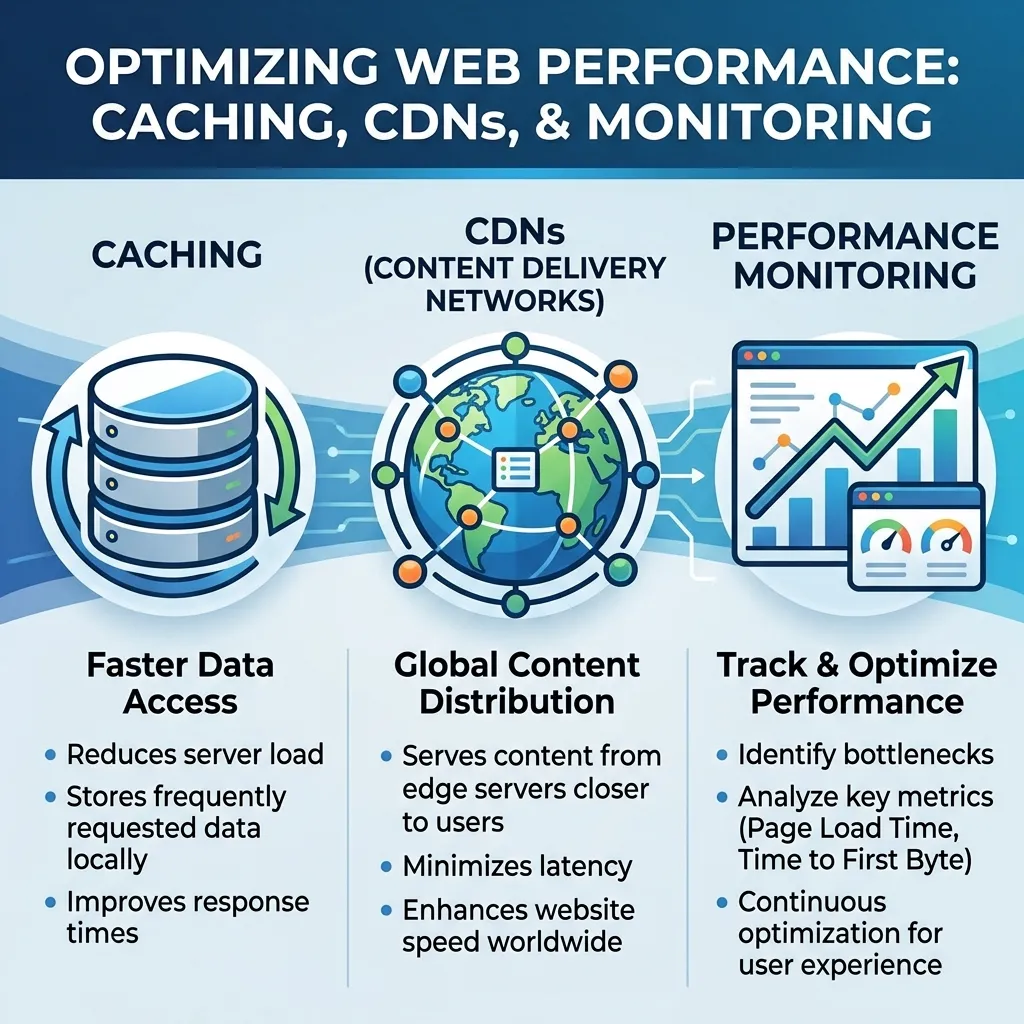
Effective caching strategies and Content Delivery Networks (CDNs) are essential components of any lightweight website theme. By setting long cache lifetimes for static assets and employing cache-busting hashes in filenames, you enable repeat visitors to load your site almost instantly. Browser caches store assets locally, while edge caching on CDN servers brings content closer to users geographically, minimizing latency.
Service workers provide an additional layer of performance enhancement. By intercepting network requests and serving cached responses, service workers enable offline caching and progressive web app (PWA) functionality. For comprehensive guidance, refer to the standards set by the World Wide Web Consortium (W3C).
Continuous performance monitoring ensures that your lightweight website theme remains optimized as you expand features. Tools like Lighthouse (built into Chrome DevTools), WebPageTest, and real user monitoring (RUM) platforms capture performance metrics from actual visitors. Automated testing should be integrated into your deployment pipeline, while manual audits conducted quarterly can catch regressions and evolving bottlenecks.
Ongoing maintenance is equally important. Automate your build process with tools such as Gulp or npm scripts to handle linting, bundling, and asset optimization. Enforce code reviews and adopt a consistent style guide to prevent bloat. Regularly update dependencies and remove outdated libraries to reduce security risks and performance overhead.
Conclusion
Lightweight website themes are more than just a trend—they represent a critical foundation for fast, accessible, and user-centric online experiences. By prioritizing minimalism, modular design, and asset optimization, you can achieve significant gains in page speed, search rankings, and user satisfaction. Employ best practices such as CSS and JavaScript tree-shaking, responsive images, web font subsetting, and robust caching strategies to keep your theme lean and efficient.
Maintaining a lightweight website theme demands continuous monitoring, regular audits, and a commitment to code quality. In today’s competitive environment, the benefits of improved performance extend beyond technical metrics, driving higher engagement, reduced bounce rates, and stronger conversions. Embrace these strategies this year to build fast, resilient, and impactful websites that delight users and meet business goals.
FAQs
What is a lightweight website theme?
A lightweight website theme is a streamlined design template optimized for fast loading, minimal code, and efficient performance, focusing only on essential features to enhance user experience and SEO.
Why are lightweight website themes important?
They improve page speed, reduce bounce rates, enhance user satisfaction, and help websites rank higher in search engines, as speed is a key ranking factor.
How do lightweight themes improve SEO?
By reducing load times and optimizing resources, lightweight themes enhance Core Web Vitals, which directly influence search engine rankings and organic visibility.
What techniques are used in lightweight web design?
Common techniques include code minification, asset optimization, lazy loading, tree-shaking, modular CSS/JS, and use of CDNs for faster content delivery.
How do images and fonts affect website performance?
Large images and unoptimized fonts slow down websites. Using compressed formats (WebP/AVIF), responsive images, and font subsetting improves speed and efficiency.
What is lazy loading in web design?
Lazy loading delays the loading of images or iframes until they are needed, improving initial page load speed and reducing bandwidth usage.
Why are CDNs important for lightweight themes?
CDNs store website content on global servers, reducing latency and delivering assets faster to users based on their geographic location.
How often should website performance be checked?
Website performance should be monitored regularly, ideally every quarter, using tools like Lighthouse or WebPageTest to identify and fix issues early.

I am a design enthusiast and theme developer, dedicated to creating beautiful, user-friendly website themes. Through ThemeOrbis.com, I shares tips, insights, and creative resources to help startups, bloggers, and businesses build stand-out websites.











No Comments